Brother SE600 Review: Is This the Best 2-in-1 Machine for Beginners?
For years, sewists faced a difficult choice: buy a dedicated sewing machine and miss out on embroidery, or shell out thousands of dollars for a high-end combination machine. The Brother SE600 changed the landscape completely by offering a computerized sewing machine and a fully functional 4×4 embroidery machine in one affordable package.
But does a “jack of all trades” machine actually perform well in both areas? Can it really handle your quilting projects and monogram your towels with equal precision? Or are you better off buying separate units?
In this comprehensive Brother SE600 review, we dive deep into its features, test its stitching quality, and compare it against its bigger siblings, the Brother SE1900 and the embroidery-only PE800, to help you decide if this is the right investment for your creative studio.
🏁 The Quick Verdict
The Brother SE600 is arguably the best value entry-level machine on the market for anyone wanting to dabble in both worlds. Its color touchscreen is a game-changer at this price point, making design editing intuitive.
Who is it for? Beginners, cosplayers, and hobbyists who want to customize clothes, make gifts, and sew garments without buying two separate machines.
Who is it NOT for? Those who need to embroider large designs (larger than 4×4 inches) or those doing high-volume production work.
Rating: ⭐⭐⭐⭐½ (4.5/5)

What is the Brother SE600?
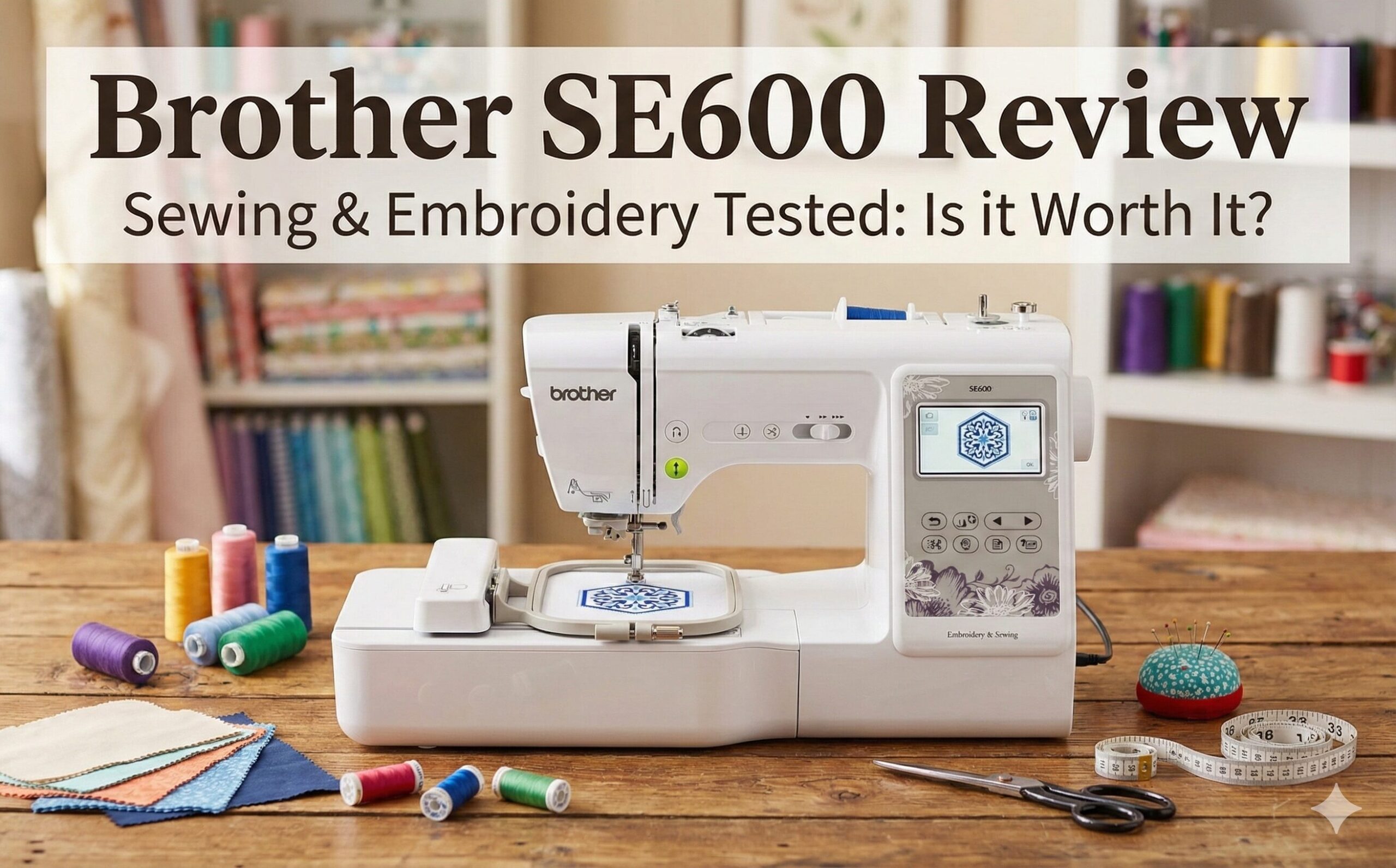
The Brother SE600 is a computerized combination machine. This means it functions as a standard sewing machine with feed dogs and a presser foot, but it also comes with an embroidery unit that slides onto the free arm. Once the embroidery unit is attached and the hoop is loaded, the machine moves the hoop in X and Y directions to stitch out digital designs.
If you are unsure what a computerized sewing machine is, essentially it uses a computer to control the motors, allowing for precise decorative stitches and automatic features that mechanical machines lack.
Key Specifications:
- Type: Combo Sewing & Embroidery
- Embroidery Area: 4″ x 4″
- Built-in Stitches: 103 sewing stitches
- Embroidery Designs: 80 built-in designs + USB port for import
- Screen: 3.2″ Color LCD Touchscreen
- Speed: 710 stitches per minute (sewing)
Deep Dive: Features That Matter
1. The 4×4 Embroidery Capability
The defining feature—and the biggest limitation—of the SE600 is the 4×4 inch embroidery field. For beginners, 4×4 is perfect for logos on polo shirts, monograms on towels, patches, and baby onesies. The machine comes with 80 built-in designs, but the real power lies in the USB port.
Unlike older models (like the SE400) that required a direct cable connection to a computer, the SE600 lets you put .PES files on a thumb drive and plug it directly into the machine. You can buy designs from Etsy or create your own, giving you unlimited creative freedom.
Note: If you plan on embroidering large jacket backs or full quilt blocks, the 4×4 area will be too small. You would need to look at the Brother PE800 vs SE600 comparison to see if the upgrade is worth it for the 5×7 hoop.
2. The Color Touchscreen
At this price point, a color LCD is a luxury. Brother’s interface is incredibly user-friendly. On the screen, you can:
- Drag and drop designs to position them.
- Rotate patterns by 1 degree, 10 degrees, or 90 degrees.
- Change thread colors virtually to see how a design looks before stitching.
- Access built-in tutorials for threading and troubleshooting.
3. Sewing Performance
Strip away the embroidery unit, and you have a capable sewing machine. It features 103 built-in stitches, including utility stitches, decorative scrolls, and 10 styles of one-step buttonholes. It utilizes a 7-point feed dog system, which provides smooth fabric feeding—critical when working with tricky materials like silk or denim.
For quilters, the drop-feed capability allows for free-motion quilting. However, the throat space (the distance from needle to tower) is standard size, so fitting a king-size quilt might be a struggle compared to a machine like the Brother PQ1500SL.
4. Automatic Needle Threader
Brother’s lever-action needle threader is one of the best in the industry. It saves you from squinting and frustration. Just guide the thread through the numbered path, press the lever, and the eye is threaded. This is a massive relief if you struggle with sewing machine needle problems or eyesight issues.
Performance Evaluation
Stitch Quality
We tested the SE600 on various fabrics. On cotton and linen, the straight stitch is impeccable. The decorative stitches are crisp, provided you use the correct stabilizer. When embroidery, the satin stitches are dense and smooth. The tension is generally good right out of the box, though it’s adjustable via a dial if you are using specialized cotton threads or metallic threads.
Ease of Use
This machine is designed for the modern beginner. The “Quick-Set” drop-in bobbin is jam-resistant and has a clear cover, so you can see when your thread is running low. The start/stop button allows you to sew without the foot pedal, which is excellent for long embroidery runs or precision sewing.
Noise Level
It is quieter than mechanical machines but does make a distinct rhythmic sound during high-speed embroidery. It’s not “whisper quiet,” but it won’t wake the neighbors. Placing it on a sturdy sewing table helps dampen vibration.
Pros & Cons
✅ The Good
- Versatility: True 2-in-1 machine saves space and money.
- Interface: Color touchscreen is intuitive and responsive.
- Connectivity: USB port makes importing designs effortless.
- Thread Cutter: Automatic thread cutter button trims top and bottom threads.
- Value: Hard to beat the feature set for the price.
❌ The Bad
- Hoop Size: Limited to 4×4 inches; cannot expand physically.
- Throat Space: A bit tight for large quilting projects.
- Software: No digitizing software included (must buy separately).
- Speed: Slower than dedicated industrial embroidery machines.
Comparison: Brother SE600 vs. The Alternatives
Brother SE600 vs. Brother SE1900
This is the most common upgrade path. The SE1900 offers a larger 5×7 inch embroidery field and 240 built-in stitches. If budget allows, the SE1900 is superior because you will eventually want a larger hoop. However, the SE1900 is significantly more expensive. Read our full comparison: Brother SE600 vs SE1900.
Brother SE600 vs. Brother PE800
The PE800 is strictly an embroidery machine—it does not sew. It has the larger 5×7 hoop. If you already own a good sewing machine (like a Brother CS7000X), you should buy the PE800 to run alongside it. If you need one machine to do everything, stick with the SE600. Check out the Brother PE800 vs SE600 guide.
Brother SE600 vs. Brother SE700
The SE700 is the newer version of the SE600. The main upgrade is Wireless LAN capability, allowing you to transfer designs from your PC without a USB stick using Brother’s Artspira app. If you hate USB sticks, the SE700 is worth the extra cost; otherwise, the mechanics are largely identical.
Maintenance & Troubleshooting
To keep your SE600 running smoothly, you need to maintain it. Embroidery generates a lot of lint.
- Clean the Bobbin Case: Remove the needle plate and brush out lint after every project. A buildup here is the #1 cause of birds nesting.
- Change Needles: Use Embroidery Needles (Red tip) for embroidery and Universal/Sharps for sewing. Change them every 8 hours of use.
- Monitor Tension: If you see the bobbin thread pulling to the top, check your top tension. See our guide on sewing machine troubleshooting.
If your machine jams, don’t force it. Check if you are using the right stabilizer. Using sewing clips instead of pins can also prevent accidental needle strikes during sewing mode.
Recommended Accessories
The box includes the basics (embroidery foot, zig-zag foot, buttonhole foot, etc.), but to really succeed, you’ll need:
- Stabilizer: Tear-away for woven fabrics, Cut-away for knits.
- Embroidery Thread: 40wt polyester thread has the best sheen.
- Rotary Cutter: Essential for cutting fabric precisely for appliqués. See how to use a rotary cutter safely.
- Small Scissors: For snipping jump threads. High-quality sewing scissors are a must.
Frequently Asked Questions
Does the SE600 come with a hard case?
No, the Brother SE600 typically ships with a soft dust cover. If you plan to travel with it, we recommend buying a universal hard case or a padded sewing machine tote.
Can I sew without the foot pedal?
Yes, the SE600 has a “Start/Stop” button located near the needle area. This is the preferred method for embroidery, but it also works for regular sewing.
Is it compatible with Mac computers?
Since it uses a standard USB flash drive to transfer files, it is compatible with both Mac and Windows. You just copy the .PES files onto the drive.
Can it sew leather?
It can handle thin, soft garment leather or vinyl, but it is not a heavy-duty machine. For thick leather work, you should consider a mechanical machine like the Brother PQ1500SL.
Final Verdict: Should You Buy the Brother SE600?
The Brother SE600 is a triumph of engineering for the price. It successfully bridges the gap for crafters who want to explore embroidery without committing to a dedicated, expensive machine.
If you are a beginner looking to personalize gifts, make cosplay costumes, or just have fun with monogramming, this machine is highly recommended. The color screen alone makes it superior to older models.
However, be realistic about the 4×4 hoop size. If you dream of embroidering large designs on the backs of denim jackets, you will outgrow this machine quickly. But for 90% of home hobbyists, the SE600 is the perfect creative companion.