Brother PE800 vs SE600: Which Machine Should You Buy?
A no-nonsense comparison between the best-selling “Combo” machine and the dedicated embroidery powerhouse. We break down hoop sizes, features, and limitations.
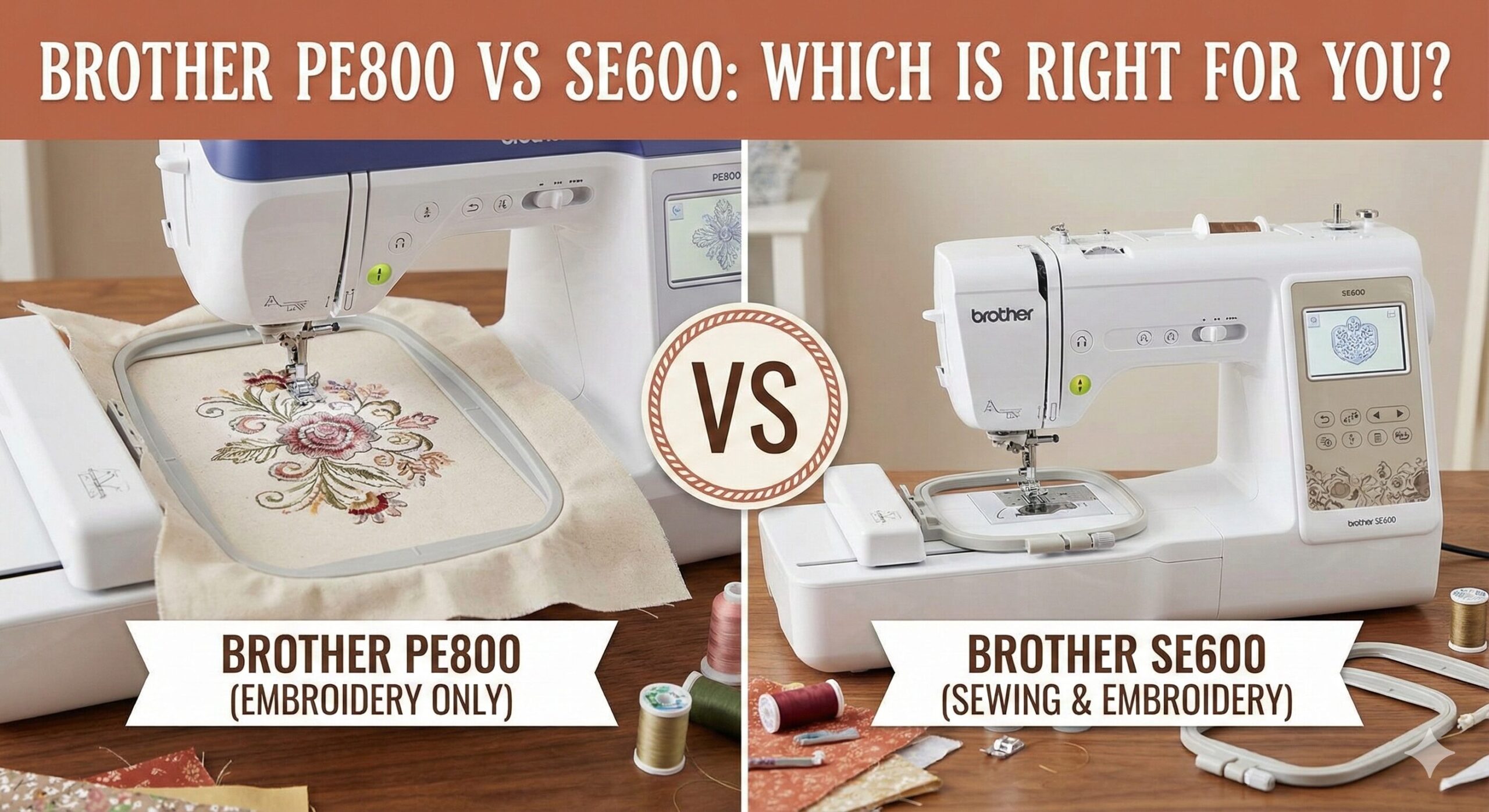
If you are looking to add professional-looking embroidery to your crafting repertoire, you have almost certainly narrowed your search down to two models: the Brother SE600 and the Brother PE800. They are the titans of the home embroidery market, consistently ranking as best-sellers on Amazon.
But here is the problem: looking at them online, they can seem confusingly similar. They share similar screens, similar button layouts, and the same brand reliability. Yet, choosing the wrong one could leave you with a machine that literally cannot do what you need it to do.
Are you looking for an all-in-one workstation that can fix a hem and embroider a logo? Or do you need a dedicated machine with a large hoop to run alongside your current setup? In this comprehensive comparison, we are going to dissect the critical differences so you don’t waste your money on the wrong tool.
The “Deal-Breaker” Difference: Functionality
Before we look at specs, we need to clear up the most common misconception beginners have about these machines.
The Brother SE600: The “Combo” Machine
The “SE” stands for Sewing & Embroidery. This machine is a 2-in-1. You can slide off the embroidery arm, snap on a standard presser foot, and use it just like a regular computerized sewing machine. It has feed dogs, a foot pedal, and 103 built-in sewing stitches. If this is your first machine ever, this is likely the route you want to take.
The Brother PE800: The Specialist
The “PE” stands for Personal Embroidery. It does not have feed dogs to pull fabric through. It does not have a foot pedal. You cannot use it to construct a garment, hem pants, or piece a quilt. Its sole purpose is to move an embroidery hoop back and forth to create designs. It is designed to sit next to your primary sewing machine (like a Janome or Singer) so you can multitask.
Quick Comparison Table
Here is the technical breakdown of how these two siblings stack up against each other.
| Feature | Brother SE600 | Brother PE800 |
|---|---|---|
| Machine Type | Sewing & Embroidery (Combo) | Embroidery ONLY |
| Max Hoop Size | 4″ x 4″ | 5″ x 7″ |
| Built-in Designs | 80 | 138 |
| Sewing Stitches | 103 | 0 (None) |
| Display | 3.2″ Color Touchscreen | 3.2″ Color Touchscreen |
| USB Port | Yes (Import designs) | Yes (Import designs) |
| Thread Trimming | Manual (between colors) | Manual (between colors) |
| Ideal User | Beginner / Space-Saver | Intermediate / Business |
The Hoop Size Dilemma: 4×4 vs 5×7
If you already have a sewing machine and are just deciding based on embroidery features, the hoop size is your deciding factor. In the world of machine embroidery, hoop size is king.
The Limit of the SE600 (4″ x 4″)
The Brother SE600 comes with a 4×4 inch hoop. This is great for:
- Chest logos on polo shirts.
- Monograms on napkins or cuffs.
- Small patches.
- Baby onesies.
However, 4 inches is smaller than you think. Most standard embroidery designs you buy online (like from Etsy or iBroidery) are digitized for a 5×7 field. If you buy the SE600, you will constantly find yourself shrinking designs (which can ruin stitch density) or splitting designs into multiple parts, which is a headache for alignment.
The Freedom of the PE800 (5″ x 7″)
The PE800 features a 5×7 inch embroidery field. This allows you to stitch larger jacket back designs, full-size names on towels, and intricate floral borders without re-hooping. If you plan to sell your items or start a small Etsy shop, the 5×7 hoop is virtually a requirement. It is the same hoop size found on the more expensive Brother SE1900 combo machine.

Brother PE800: The Large Hoop Winner
If you don’t need a sewing machine, don’t pay for one. Get the larger embroidery field instead.
Check PE800 Price on AmazonDeep Dive: Brother SE600 Review
The Brother SE600 is the successor to the legendary SE400. It modernized the line with a color touchscreen, which was a massive upgrade from the old pixelated monochrome screens. It is arguably the best value entry-level machine on the market because you get two machines for the price of one.
Sewing Capabilities
As a sewing machine, the SE600 is surprisingly robust. It features:
- 103 Stitches: Including decorative scrolls, quilting stitches, and 10 automatic buttonholes.
- Needle Up/Down: Essential for pivoting corners.
- Speed Control Slider: Great for beginners learning to control fabric.
It handles cottons and knits beautifully. It can handle denim if you use the correct jeans needle and take it slow, but it isn’t a “Heavy Duty” machine. If you plan on sewing thick quilts, you might want to look at intermediate machines with larger throat space.
Pros
- Versatility: Sews and embroiders in one compact unit.
- Price: Extremely affordable entry point.
- User-Friendly: Color screen makes editing easy.
- Small Footprint: Great for apartments or dorms.
Cons
- Hoop Size: 4×4 limit is quickly outgrown.
- Speed: 710 stitches per minute is modest.
- Throat Space: Tight for bulky quilting projects.

Brother SE600: Best For Beginners
The perfect starting point for anyone who wants to do it all without breaking the bank.
Check SE600 Price on AmazonDeep Dive: Brother PE800 Review
The PE800 is for the specialist. If you are reading this and you already own a reliable sewing machine—maybe a Brother CS7000X or a vintage Singer—then the PE800 is likely your best choice.
Why Multitasking Matters
Embroidery takes time. A dense, multi-color design can take 45 minutes to stitch out. If you have an SE600 (Combo), your sewing machine is tied up for that entire 45 minutes. You can’t sew a pillowcase while the machine is embroidering the pillow front.
With the PE800, you have a dedicated station. You can set it to embroider, and while it hums away in the background, you can turn your chair and continue sewing on your main machine. This workflow is essential for anyone doing production work or gifts during the holidays.
Pros
- Hoop Size: 5×7 field opens up 90% of commercial designs.
- Workflow: Allows simultaneous sewing and embroidery (with a second machine).
- Designs: Comes with more built-in designs (138 vs 80).
- Edit Features: Easier to combine designs on the screen due to more space.
Cons
- No Sewing: One-trick pony (but a good trick).
- Price: More expensive than the SE600 despite doing “less”.
Shared Features: What’s the Same?
It is worth noting that the technology driving the embroidery on both machines is identical. If you embroider a 3-inch flower on the SE600 and the same 3-inch flower on the PE800, the stitch quality will look exactly the same.
- LCD Screen: Both have the 3.2″ Sew Smart color touchscreen. You can drag, drop, rotate, and change thread colors on screen.
- USB Connectivity: Both allow you to download .PES files and transfer them via USB stick.
- Automatic Needle Threader: Both use Brother’s lever-action threader (a lifesaver).
- Top Drop-in Bobbin: Both use standard Class 15 bobbins.
If you encounter issues like thread nesting or jamming on either machine, the solutions are usually the same. Check our guide on why sewing machines jam for troubleshooting tips.
Essential Accessories You Will Need
Regardless of which machine you choose, the box doesn’t contain everything you need to start embroidering professionally. You should budget for:
1. Stabilizer
You cannot embroider without it. It goes under the fabric to support the stitches. There are tear-away, cut-away, and water-soluble types. Using the wrong one is a major cause of machine issues.
2. Embroidery Thread
Regular sewing thread is too thick and lacks sheen. You need 40wt polyester or rayon embroidery thread. Read our guide on best threads to understand the differences.
3. Curved Snips
To cut the “jump threads” (the thread that trails between different parts of the design) close to the fabric, you need specialized double-curved scissors. Check our sewing scissors guide for recommendations.
Frequently Asked Questions
Can I upgrade the hoop size on the SE600 later?
No. While you can buy “multi-position” hoops, the machine’s physical arm limits the maximum stitch area to 4×4 inches. To stitch larger, you must split the design in software and sew it in sections, which is difficult.
Does the PE800 come with software?
Neither machine comes with digitizing software (to create your own logos). They come with built-in fonts and designs. To make custom designs, you need to buy software like Brother PE-Design, Hatch, or Embrilliance.
What do I do if I get an E6 error?
The E6 error is a common safety stop on Brother machines, usually indicating a thread tangle or that the motor is locked. We have a full guide on fixing the Brother E6 error here.
Is the PE800 discontinued?
The PE800 is slowly being phased out for newer models with Wi-Fi (like the PE900), but it remains widely available and is still supported by Brother. It is often found at a better price point than the newer Wi-Fi models.
Can I use these machines for quilting?
The SE600 can be used for piecing quilts and free-motion quilting (with feed dogs dropped). The PE800 cannot piece quilts, but you can use it to embroider quilt blocks in the hoop. For serious quilting, you’ll need good cutting mats and rotary cutters.
Final Verdict: Which One Wins?
The battle between the Brother PE800 vs SE600 isn’t about which machine is “better”—it’s about what you already own.
Choose the Brother SE600 If:
- You do not own a sewing machine and need one device to do it all.
- You have limited desk space (dorm, apartment).
- You are on a budget and want to dip your toes into embroidery without a huge investment.
- You primarily want to embroider small items like chest logos or baby clothes.
Choose the Brother PE800 If:
- You already have a sewing machine you love.
- You plan to sell items (the 5×7 hoop is essential for commercial visibility).
- You want to embroider and sew at the same time for efficiency.
- You know that the 4×4 hoop limitation will frustrate you eventually.
The Bottom Line: If budget allows, the Brother PE800 (or the upgraded SE1900 combo) is the better long-term investment because you won’t outgrow the hoop size as quickly. But for a complete beginner starting from zero, the Brother SE600 is an unbeatable value proposition.
Our Top Pick for Most Users
The Brother SE600 offers the best bang for your buck, getting you sewing and embroidering immediately.
Check Latest SE600 Price