Brother PE800 vs SE1900: Embroidery Only or The Full Package?
A comprehensive, deep-dive comparison to help you decide whether to save money with a dedicated machine or invest in the ultimate combo workstation.
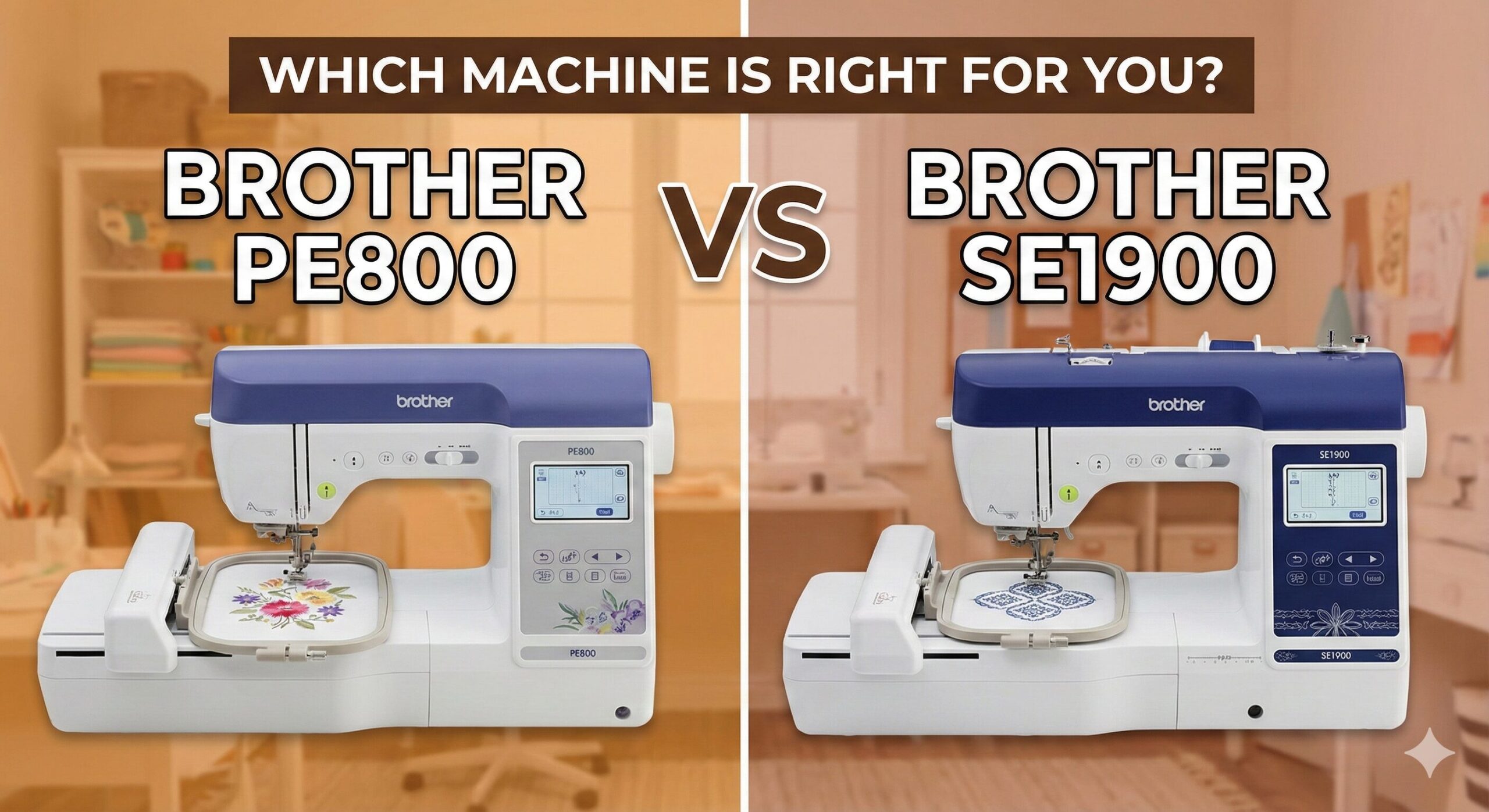
Choosing a new machine is never easy, especially when two of the top contenders look almost identical on the shelf. If you have been researching mid-range embroidery machines, you have undoubtedly narrowed your list down to the Brother PE800 and the Brother SE1900.
At first glance, they seem to share the same DNA. They both boast a generous 5×7 inch embroidery field, a color LCD touchscreen, and that reliable Brother build quality. Yet, there is a significant price gap between them. Why? The answer lies in their fundamental purpose: one is a specialist, and the other is a generalist powerhouse.
In this guide, we aren’t just reading the spec sheet to you. We are going to analyze the workflow, the value for money, and the specific use cases for each machine. Whether you are upgrading from a basic Brother CS7000X or stepping into the world of embroidery for the first time, this comparison will clarify exactly which model belongs in your craft room.
The Core Difference Explained
Before we look at the charts, let’s address the most important distinction immediately. If you miss this, you might buy a machine that literally cannot do what you need it to do.
Brother PE800: “Personal Embroidery”
The “PE” stands for Personal Embroidery. The PE800 is an embroidery-only machine. It does not sew. It has no feed dogs to pull fabric through, no foot pedal, and no utility stitches like straight stitch or zigzag. You cannot hem a pair of jeans or piece a quilt top with this machine. It exists solely to move an embroidery hoop in X and Y coordinates to create designs.
Brother SE1900: “Sewing & Embroidery”
The “SE” stands for Sewing and Embroidery. The SE1900 is a dual-function combo machine. It is essentially a high-end computerized sewing machine (comparable to the Brother NS1750D) combined with the embroidery unit of the PE800. You can remove the embroidery arm, attach a standard presser foot, and sew a dress, then attach the arm to embroider a logo on that same dress.
For a broader context on how combo machines compare to entry-level models, you might want to read our comparison of the Brother SE600 vs SE1900.
Quick Comparison Table: Specs at a Glance
| Feature | Brother PE800 | Brother SE1900 |
|---|---|---|
| Machine Type | Embroidery ONLY | Combo (Sewing + Embroidery) |
| Hoop Size | 5″ x 7″ | 5″ x 7″ |
| Built-in Stitches | 0 (None) | 240 Sewing Stitches |
| Embroidery Designs | 138 | 138 |
| Sewing Speed | N/A | 850 SPM |
| Embroidery Speed | 650 SPM | 650 SPM |
| Auto Thread Cutter | Yes (Jump stitches) | Yes (Sewing & Embroidery) |
| Screen | 3.2″ Color Touchscreen | 3.2″ Color Touchscreen |
| Knee Lifter | No | Compatible (Included in some bundles) |
| Price Tier | Mid-Range | High-End |
The Shared DNA: Where They Are Identical
Because the SE1900 is essentially built on the PE800 platform (or vice versa), the embroidery experience is virtually indistinguishable. If you buy the cheaper PE800, you are not getting “worse” embroidery quality. Here is what is identical:
1. The 5×7 Embroidery Field
Both machines use the same 5″ x 7″ hoop. This is the “sweet spot” for most hobbyists. Unlike the limiting 4×4 hoop found on cheaper models, a 5×7 field allows you to monogram adult-sized sweatshirts, create large quilt labels, and stitch decent-sized in-the-hoop (ITH) projects like zipper bags.
2. LCD Touchscreen Interface
Both utilize a 3.2-inch color LCD screen. The software onboard allows you to:
- Rotate patterns by 1, 10, or 90 degrees.
- Mirror image designs.
- Change thread colors on screen.
- Combine multiple elements (e.g., adding text to a heart shape).
It is intuitive and beginner-friendly. To understand more about these digital interfaces, check out our guide on sewing machine features explained.
3. Connectivity
Both machines feature a USB port on the side. You are not limited to the 138 built-in designs. You can purchase designs online (in .PES format), save them to a flash drive, and plug it directly into the machine. This expandability is crucial for longevity.
The Major Divergence: Sewing Capabilities
This is where the Brother SE1900 justifies its higher price tag. It isn’t just a sewing machine; it is a feature-rich sewing machine.
My Custom Stitch™ & Feeding System
The SE1900 includes Brother’s “My Custom Stitch” feature, allowing you to design your own decorative sewing stitches on the LCD screen. More importantly, it uses the Square Feed Drive System (SFDS). Unlike the oval motion of traditional feed dogs, SFDS moves in a square box motion, keeping longer contact with the fabric.
Why does this matter? If you are sewing denim or tricky layers, SFDS provides superior traction. If you run into issues with feeding, it’s often a technique issue, but this system helps prevent common sewing machine problems.
Quilting Features
The SE1900 is excellent for quilters. It has a larger throat space than standard compact machines and includes drop-feed capability for free-motion quilting. While it doesn’t come with a massive extension table out of the box (depending on the bundle), it is fully compatible with large sewing tables that support heavy quilts.
Automatic Knee Lifter
The SE1900 supports a knee lifter (a lever you operate with your knee to lift the presser foot). This allows you to keep both hands on your fabric while pivoting corners—a feature usually reserved for industrial or high-end machines.

Brother SE1900: The Versatile Powerhouse
If you want one machine that does it all—garment construction, quilting, and embroidery—this is the gold standard.
Check Price on AmazonBrother PE800 Review: The Specialist
The PE800 is a fan favorite for a reason. It does one thing, and it does it very well. If you already have a sewing machine you love (perhaps a trusty mechanical Janome or a vintage Singer), you don’t need the sewing features of the SE1900.
By purchasing the PE800, you are essentially buying the “embroidery module” add-on for your sewing room. The advantage here is workflow efficiency. You can have your PE800 embroidering a 40-minute design in the corner while you use your sewing machine to stitch seams on another project.
Brother PE800 Pros
- Cost Effective: Significantly cheaper than the SE1900.
- Workflow: Allows you to embroider and sew simultaneously (if you have a second machine).
- Ease of Use: Dedicated menus means less clutter in the interface.
- Lightweight: Easier to transport to embroidery meetups.
Brother PE800 Cons
- Zero Sewing: One-trick pony. Can’t even do a straight stitch repair.
- Space: Requires a dedicated spot; you can’t just swap modes.
Just remember, embroidery requires specific supplies. You will need specialized threads and stabilizers. Don’t try to use standard sewing thread!

Brother PE800: The Dedicated Specialist
Perfect for business owners or hobbyists who already own a sewing machine and want to add embroidery capabilities for less.
Check Price on AmazonBrother SE1900 Review: The All-in-One
The SE1900 is the ultimate space-saver. If you live in an apartment or have a small sewing corner, having two machines is impractical. The SE1900 gives you high-end sewing and high-end embroidery in one footprint.
It also offers 240 built-in sewing stitches compared to the 0 on the PE800 (obviously) and significantly more than the 103 on the smaller SE600. It includes 10 styles of one-step buttonholes, which is fantastic for garment makers.
Brother SE1900 Pros
- Space Saving: Two high-end machines in one body.
- Sewing Features: Knee lifter, SFDS feeding, auto reinforcement stitch.
- Resale Value: Combo machines with 5×7 hoops hold value incredibly well.
- Hoop Size: Large 5×7 area matches the PE800.
Brother SE1900 Cons
- Price: A significant investment upfront.
- Downtime: If the machine goes in for service, you lose both your sewing and embroidery capabilities.
Who Wins on Accessories?
Both machines come with the necessary feet and tools for their primary functions. However, the SE1900 box is much heavier. It includes:
- Zigzag foot, Buttonhole foot, Overcasting foot, Monogramming foot, Zipper foot, Blind stitch foot, Button fitting foot.
- Embroidery foot (same as PE800).
The PE800 only includes the embroidery foot. If you buy the PE800, you don’t need the others, but it highlights the value difference.
Regardless of which you choose, you will need to invest in quality cutting tools. We recommend a good set of sewing scissors and perhaps sewing clips to keep your projects organized.
Frequently Asked Questions
Is the Brother PE800 discontinued?
Brother updates their lineup frequently. While the PE800 is still widely available and supported, its successors (like the PE900) are entering the market with Wi-Fi capabilities. However, the PE800 remains a top seller due to its reliability and lower price point.
Can I upgrade the hoop size on these machines to something larger than 5×7?
Technically, you can buy “multi-position” hoops (like a 5×12), but the machine can still only stitch a 5×7 area at one time. You have to split your design in software and move the hoop. Neither machine can physically stitch a single 8×8 design in one pass.
Which software should I use with these machines?
Brother uses the .PES file format, which is the industry standard for home machines. You can use specialized software like Embrilliance, Hatch, or Brother’s own PE-Design to create or edit files, then transfer them via USB.
What happens if I get an E6 error?
The E6 error usually indicates a thread tangle or motor safety stop. It is common on Brother machines when the top thread isn’t in the take-up lever properly. See our guide on Brother E6 errors for a quick fix.
Can I use these machines for a home business?
Yes! Many Etsy shop owners start with a PE800 or SE1900. They are robust enough for small batch production (like monogramming towels or bags). However, they are single-needle machines, so you have to change thread colors manually, which slows down high-volume production.
Final Verdict: Which One Should You Buy?
The decision between the Brother PE800 vs SE1900 is surprisingly simple once you define your current setup.
The Case for the Brother PE800
Buy the PE800 if: You already own a sewing machine that you love. There is no need to pay for extra sewing features you won’t use. The PE800 adds powerful embroidery capabilities to your studio without redundancy. It is the smart, budget-conscious choice for established sewists.
The Case for the Brother SE1900
Buy the SE1900 if: You want to upgrade your current sewing machine AND start embroidery, or if you have limited space. The sewing features on the SE1900 (SFDS, knee lifter, 240 stitches) are premium upgrades over standard mechanical machines. It is a complete creative station in one box.
Both machines are excellent, reliable workhorses that will hold their value for years. The “better” machine is simply the one that fits the gap in your current toolset.
Our Top Recommendation for Versatility
If you can stretch the budget, the SE1900 offers the best long-term value by combining two premium machines into one.
Check Latest Price for Brother SE1900